

Hard Drive Data Recovery Indianapolis: What to Do When Your Data Is at Risk

A hard drive can fail without much warning. One day, files open normally, and the next, a computer may become unusually slow, stop recognizing the drive, or refuse to boot altogether. For Indianapolis residents and businesses, a failed drive can mean much more than replacing a piece of hardware. Important documents, financial records, customer information, photographs, project files, and other data may be at risk.
When that happens, hard drive data recovery in Indianapolis may be a better first step than immediately attempting to repair, format, or replace the drive.
Data recovery is different from ordinary computer repair. The objective is to determine whether the information on the affected drive can be safely retrieved while avoiding actions that could make the situation worse.
What Is Hard Drive Data Recovery?
Hard drive data recovery is the process of attempting to retrieve files and information from a storage device that has become inaccessible, damaged, corrupted, or accidentally erased.
The problem can be caused by many different situations. A drive may have suffered a physical failure, a corrupted file system, accidental deletion, malware-related damage, power problems, or another issue that prevents normal access to the stored information.
The important distinction is that data recovery focuses on the information, not simply on getting the computer running again.
For example, replacing a failed hard drive may restore the computer, but it does not automatically bring back the files that were stored on the old drive.
That is why it can be important to evaluate the affected drive before making major changes.
Common Reasons Hard Drives Fail
Hard drives can become inaccessible for several reasons. Understanding the potential cause can help determine what to do next.
Mechanical Failure
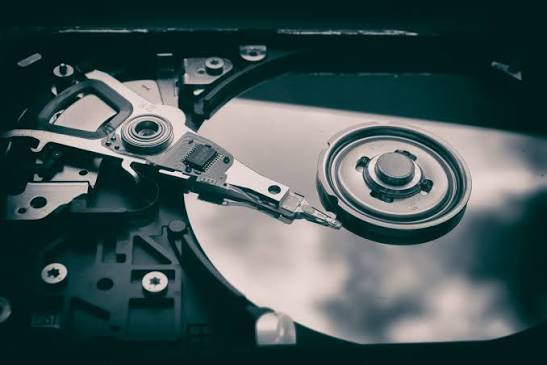
Traditional hard disk drives contain moving components. Over time, those components can wear out or become damaged.
Possible symptoms include:
- Clicking or unusual noises
- The drive repeatedly starting and stopping
- The computer failing to recognize the drive
- Extremely slow file access
- Files becoming inaccessible
- The system failing to boot
A drive making unusual mechanical noises should not be repeatedly restarted simply to see if it will work again.
Accidental Deletion
Not every data-loss situation involves physical damage. Someone may accidentally delete an important folder or remove files that were still needed.
Depending on what happened afterward, deleted information may sometimes be recoverable.
The more the affected storage is used after deletion, however, the greater the possibility that new data could overwrite information that might otherwise have been recovered.
File System or Data Corruption
A drive can still appear to function while its files become inaccessible.
Corruption can occur because of improper shutdowns, software problems, hardware issues, malware, or other events. In these situations, the drive may be detected by the computer, but individual files or folders may not open correctly.
Power or Hardware Problems
A power event, failing computer component, damaged connection, or other hardware issue can also result in inaccessible data.
In some situations, the problem may not be with the storage media itself. Proper diagnosis is therefore important before assuming the drive has completely failed.
Signs You May Need Hard Drive Recovery
Not every computer problem means data recovery is necessary. However, certain warning signs deserve attention.
Watch for:
- A hard drive suddenly disappearing from the computer
- Repeated error messages when opening files
- Unusual clicking, grinding, or buzzing sounds
- Files becoming corrupted or inaccessible
- Extremely slow performance
- Frequent system crashes
- The operating system failing to boot
- A drive that was dropped or physically damaged
- Important files disappearing unexpectedly
- A computer asking you to format a drive that previously contained accessible data
If important information is stored on the affected drive, avoid treating the warning as a normal computer slowdown.
The next step should be determining whether the data is still accessible and what caused the problem.
HDD vs. SSD: Does the Type of Drive Matter?
Yes. The technology used by the storage device can affect how a data-loss situation should be approached.
HDD Recovery
Traditional hard disk drives store information on magnetic platters and use mechanical components to read and write data.
Because they contain moving parts, HDDs can experience mechanical failures in addition to logical problems such as deletion or corruption.
If an HDD is making unusual noises or is no longer being detected, repeated attempts to access it may not be the best approach.
SSD Recovery
Solid-state drives do not use the same mechanical components as traditional HDDs. Instead, they use flash memory and controllers to store and manage information.
SSD data recovery can involve different challenges, particularly when the issue involves the controller, flash memory, firmware, or how deleted data is handled by the drive.
This is one reason there is no single recovery method that works for every storage device.
The type of drive, nature of the failure, and condition of the stored data all matter.
Accidental Deletion Is Different From Physical Drive Failure
A deleted file and a physically damaged drive may look like similar problems to an everyday computer user, but they are very different situations.
With accidental deletion, the storage device may still be functioning normally. The issue is that the operating system no longer has a normal reference to the file.
With physical failure, the drive itself may be damaged or malfunctioning.
This distinction matters because the wrong response can potentially make recovery more difficult.
For example, immediately formatting a drive, reinstalling an operating system, or repeatedly running repair utilities may alter the storage device before its condition has been properly assessed.
When Should You Stop Using a Failing Drive?
If the drive contains important information and is showing signs of failure, stop unnecessary use as soon as practical.
That means avoiding actions such as:
- Repeatedly restarting a failing drive
- Installing new software onto it
- Saving new files to it
- Formatting it
- Reinstalling the operating system
- Running multiple unverified recovery programs
- Attempting physical repairs without the appropriate expertise
This is especially important when the drive contains business-critical information.
Continuing to use a damaged storage device can potentially change the condition of the data or make an already complicated recovery situation more difficult.
If the information is valuable, preserving the existing state of the drive can be more important than experimenting with different fixes.
Why DIY Data Recovery Can Make the Situation Worse
Searching online for a quick recovery solution is understandable. There are many software tools that claim to recover deleted or inaccessible files.
These tools can be useful in appropriate situations, particularly when the drive is healthy and the problem is limited to certain types of logical data loss.
The problem comes when the actual issue is physical failure or significant corruption.
Running repeated scans against a failing drive can place additional activity on the device. Formatting, partition changes, or installing recovery software on the affected storage can also complicate the situation.
Physical drive problems present another concern. Opening or attempting to repair storage hardware without the right environment and expertise can cause additional damage.
For valuable or irreplaceable information, professional evaluation is generally a safer starting point than repeatedly experimenting with the original drive.
Business Data Recovery Requires Extra Consideration
For a business, losing a hard drive can have consequences beyond the loss of a few files.
A failed computer or storage device may contain:
- Customer records
- Accounting documents
- Contracts
- Project files
- Employee information
- Business correspondence
- Operational documents
- Marketing assets
- Databases
- Historical records
The value of this information may not be obvious until employees suddenly cannot access it.
For example, an Indianapolis business that loses access to a computer containing years of customer or financial information may face delays even if another computer can be purchased immediately.
The hardware can often be replaced. The information stored on it may be much harder to recreate.
That is why business data recovery in Indianapolis should be approached as a data-protection issue as well as a technical problem.
Businesses should also consider what happens after the immediate recovery issue is resolved. Reliable backup practices, security controls, maintenance, and ongoing technology management can help reduce the impact of future incidents. Businesses looking at broader technology support can learn more about managed IT services and how ongoing IT management can support business operations.
When Is Professional Data Recovery Appropriate?
Professional assistance can make sense when the information is important and the cause of the problem is unclear.
Consider getting professional help if:
- The drive is physically damaged
- The drive makes unusual sounds
- The computer does not recognize the drive
- Important files have suddenly disappeared
- The drive was dropped or exposed to another physical event
- Files are severely corrupted
- A business-critical drive has failed
- Standard recovery attempts have not worked
- The information cannot easily be recreated
A professional assessment can help determine what happened before additional steps are taken.
The goal is not simply to make the drive appear functional again. The priority is determining whether the information can be safely accessed or recovered.
For businesses that need broader assistance with computers, networks, storage, and ongoing technology problems, choosing the right IT support in Indianapolis can also help create a more proactive approach to technology management.
Hard Drive Repair vs. Data Recovery
These terms are sometimes used interchangeably, but they are not the same.
Hard drive repair generally focuses on restoring the storage device or computer to working condition.
Data recovery focuses on retrieving the information stored on the affected device.
For example, if a hard drive has failed, installing a new drive may solve the computer’s hardware problem. But if important files were stored only on the failed drive, replacing it does not solve the data-loss problem.
That distinction is particularly important before disposing of or formatting an old drive.
If the data matters, determine whether recovery should be attempted before moving forward with hardware replacement.
What Indianapolis Customers Should Do After Data Loss
If you are dealing with a failed or inaccessible drive in Indianapolis, the first step is to avoid making the situation more complicated.
A practical approach is:
1. Stop unnecessary activity.
If the drive is behaving abnormally, avoid continuing to use it simply to test whether it will eventually work.
2. Identify what data is important.
Determine whether the affected drive contains business records, personal files, photographs, financial information, or other data that cannot easily be recreated.
3. Consider what caused the problem.
Was the file deleted accidentally? Did the computer crash? Was the drive dropped? Did it suddenly stop being recognized?
4. Avoid unnecessary formatting or repairs.
Do not assume that making the drive usable again will automatically recover the information stored on it.
5. Seek professional guidance when the data is valuable.
A qualified IT or data recovery provider can help determine what options may be appropriate for the situation.
Choosing Data Recovery Services in Indianapolis
When looking for data recovery Indianapolis businesses or service providers, do not focus only on whether someone can replace a hard drive.
Ask how the provider approaches the actual data-loss problem.
Important questions include:
- Can they assess the cause of the failure?
- Do they distinguish logical and physical data loss?
- Do they understand both HDD and SSD storage?
- Can they explain the risks before attempting recovery?
- Do they work with business-critical information?
- What happens to the original drive during the process?
- Can they explain the recovery process in understandable terms?
The right provider should help you understand the situation rather than encouraging unnecessary repairs or changes before the data has been evaluated.
Hard Drive Data Recovery Indianapolis: Don’t Make the Problem Bigger
A failed hard drive does not necessarily mean that your files are gone forever. At the same time, continuing to use a failing drive or experimenting with unfamiliar recovery methods can potentially make a difficult situation more complicated.
Whether the problem involves accidental deletion, file corruption, an inaccessible HDD, an SSD problem, or a physically damaged drive, the first priority should be protecting the information that still matters.
For Indianapolis businesses and individuals, hard drive data recovery should therefore be treated as a separate concern from simply replacing a computer or storage device.
If important information is at risk, getting the situation assessed before making major changes can help you make a more informed decision.
Protect Your Data Before a Drive Fails
The best time to think about data recovery is before an important drive fails.
Reliable backups, appropriate security controls, regular maintenance, and a clear recovery plan can reduce the impact of future hardware problems. Businesses can also review their broader technology protection strategy through IT security services for small businesses and make sure security and recovery planning are considered together.
For organizations that increasingly rely on cloud-based systems and remote access, understanding how cloud computing supports remote and hybrid work can also be part of a broader technology and data-management strategy.
But when a drive has already failed, the immediate priority is protecting the information that may still be recoverable.
If you are dealing with a failed hard drive, inaccessible files, or another data-loss problem in Indianapolis, Reciprocal Tech can help you evaluate the situation and determine the appropriate next step.
Rather than immediately formatting the drive, replacing hardware, or repeatedly trying recovery software, get the problem assessed first. The right approach can make a significant difference when the information on the drive matters to you or your business.
Frequently Asked Questions
1. How much does hard drive data recovery cost in Indianapolis?
The cost can vary significantly depending on the type of storage device, cause of failure, condition of the data, and complexity of the recovery. A proper assessment is usually needed before determining what recovery may involve.
2. Can a failed hard drive be recovered?
Sometimes. Recoverability depends on factors such as whether the problem is logical or physical, the condition of the storage media, and what has happened since the failure occurred. There is no guarantee that every failed drive can be recovered.
3. Should I keep using a hard drive that is failing?
If the drive contains important information and is showing signs of failure, unnecessary use should generally be avoided. Continued activity can potentially make some recovery situations more difficult.
4. Is hard drive repair the same as data recovery?
No. Hard drive repair focuses on restoring the hardware or system, while data recovery focuses on retrieving information from a storage device that is inaccessible, damaged, corrupted, or affected by accidental deletion.
5. Can deleted files be recovered?
In some situations, deleted files may be recoverable. The likelihood can depend on what happened after deletion and whether new information has overwritten the previous data.
About the Author

Christa Turner
Author’s recent posts
Download the
Business Owner’s Cybersecurity Blueprint